Reversing Cuphead: Invincibility via DLL Patching

Table of Contents
Introduction⌗
Last weekend I noticed the game Cuphead by Studio MDHR, was on sale on Steam.
I absolutely love the aesthetic of it, and it seems like a fun platformer game I could have fun with.
I’ve heard the game was quite hard and I was never a skilled gamer. I bought it anyway, and as I started playing, without a controller on my PC I noticed I was absolutely horrible at it, even though it was quite fun.
That’s where I started wondering how hard would it be to actually modify it, either by memory manipulation or modding to have infinite lives, and just carry on with the levels without restarting, enjoying the story without the burden of mistakes.
Reading program memory.⌗
The easiest way that came to mind was to read the process memory and try to figure out where are the current lives in memory, just edit it to a very large number.
But there is a problem with that approach, because modern operating systems and engines use dynamic memory allocation, the hardware address of the player’s health changes every time a level loads.
We’d have to find pointer paths to automate it, which doesn’t really seem like the way to go.
Exploring the installation folder.⌗
Exploring the installation folder I could see some files and folders but nothing too interesting.
.
├── Cuphead.exe
├── Cuphead_Data
├── EULA.txt
├── Launch Cuphead.lnk
├── gog.ico
├── goggame-1963513391.hashdb
├── goggame-1963513391.ico
├── goggame-1963513391.info
├── goggame-1963513391.script
├── goglog.ini
├── support.ico
├── unins000.dat
├── unins000.exe
├── unins000.ini
├── unins000.msg
└── webcache.zip
Until I checked the Cuphead_Data folder.
There I see Unity Engine DLL which told me this was a Unity game. This is massive because Unity games are mostly written in C# and are compiled to an Intermediate Language (IL), which is very easy to reverse!
Cuphead_Data
├── Managed
│   ├── Assembly-CSharp-firstpass.DLL
│   ├── Assembly-CSharp.DLL
│   ├── Mono.Posix.DLL
│   ├── Mono.Security.DLL
│   ├── Rewired_Core.DLL
│   ├── Rewired_Windows_Lib.DLL
│   ├── System.Configuration.DLL
│   ├── System.Core.DLL
│   ├── System.Security.DLL
│   ├── System.Xml.DLL
│   ├── System.DLL
│   ├── UnityEngine.CloudBuild.DLL
│   ├── UnityEngine.Networking.DLL
│   ├── UnityEngine.UI.DLL
│   ├── UnityEngine.DLL
│   ├── UnityEngine.DLL.mdb
│   └── mscorlib.DLL
├── Mono
│   ├── MonoPosixHelper.DLL
│   ├── etc
│   └── mono.DLL
├── Plugins
│   ├── CSteamworks.DLL
│   ├── ConsoleUtils.DLL
│   ├── DataPlatform.DLL
│   ├── Gamepad.DLL
│   ├── Storage.DLL
│   ├── UnityPluginLog.DLL
│   ├── Users.DLL
│   └── steam_api.DLL
├── Resources
│   ├── unity default resources
│   └── unity_builtin_extra
├── app.info
├── globalgamemanagers
├── globalgamemanagers.assets
├── level0
├── level1
├── level10
├── level11
So I took my shot, and downloaded dnSpyEx to try to explore the game DLLs.
Opening Assembly-CSharp.dll with dnSpyEx is the first obvious step if you tinkered a bit with Unity, since it is usually the file where the game engine stores almost all the game scripts.
As I opened and decompiled the DLL I was impressed with how much of the original source code and how readable it was, I immediately started looking for Player kind of classes within the C# code.
After exploring a bit I found this class:
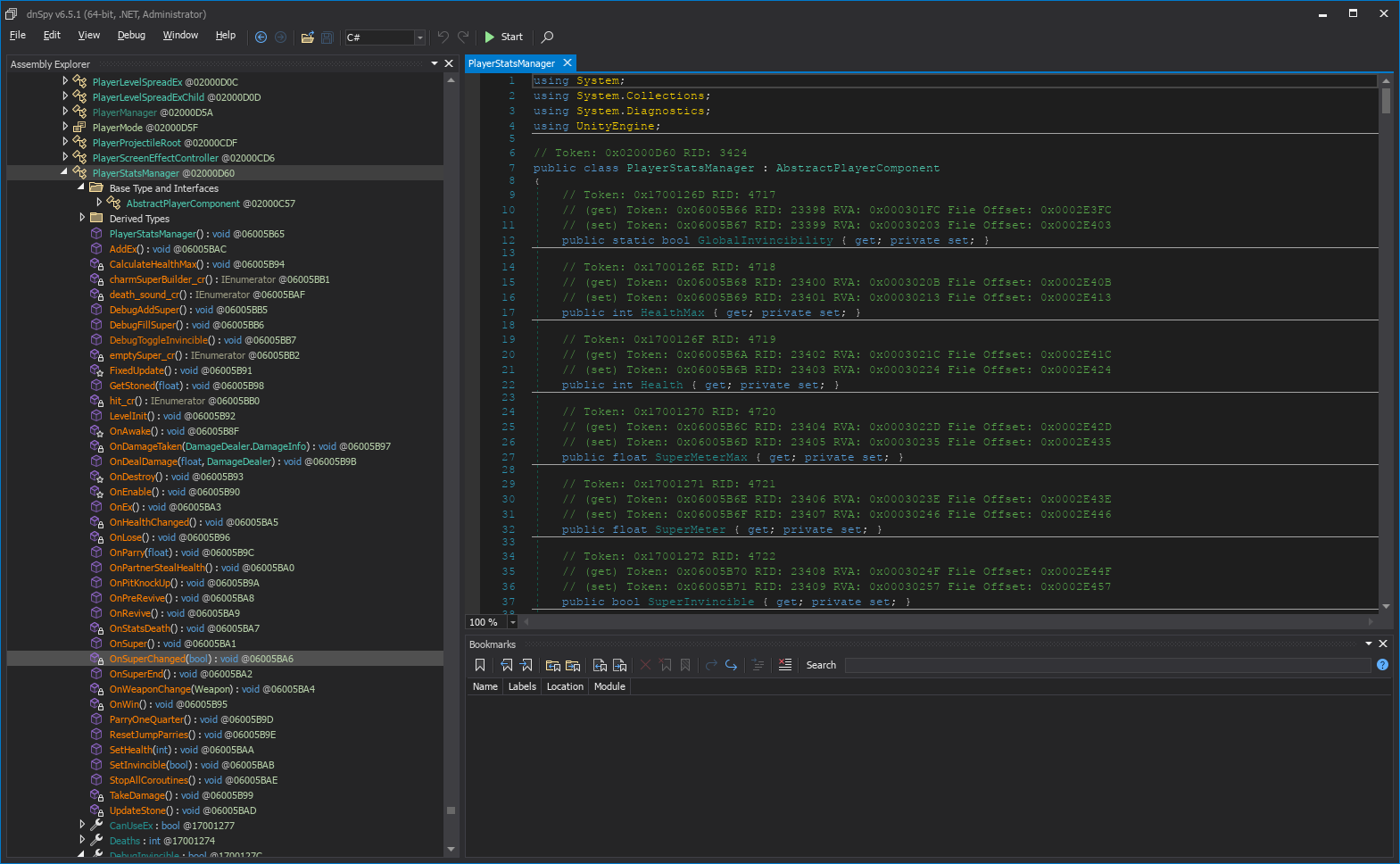
It is perfect! It has Health and HealthMax, and all player stats, and it inherits from a Unity AbstractPlayerComponent But look closer…
It has also debug members!, including for player invincibility!
public class PlayerStatsManager : AbstractPlayerComponent
// ...
	protected override void OnAwake()
	{
		base.OnAwake();
		PlayerStatsManager.GlobalInvincibility = false;
		PlayerStatsManager.DebugInvincible = false;
		this.SuperInvincible = false;
		base.basePlayer.damageReceiver.OnDamageTaken += this.OnDamageTaken;
		LevelPlayerWeaponManager component = base.GetComponent<LevelPlayerWeaponManager>();
		if (component != null)
		{
			component.OnWeaponChangeEvent += this.OnWeaponChange;
			component.OnSuperEnd += this.OnSuperEnd;
		}
		PlanePlayerWeaponManager component2 = base.GetComponent<PlanePlayerWeaponManager>();
		if (component2 != null)
		{
			component2.OnWeaponChangeEvent += this.OnWeaponChange;
		}
		this.Deaths = 0;
		this.hardInvincibility = false;
	}
//...
So we have 3 types of invincibility in the game, then I was wondering which one do I want, so I decided to explore a bit and found out:
-
GlobalInvincibilityis set to true when the player wins and loses, I believe this is to avoid bugs where the player dies right after finishing a level. This makes it be a bad option to toggle and force to true because it messes with the internal game state. -
SuperInvincibleIt is used and set by a specific class calledPlayerSuperInvinciblewhich sets this property to the player and manages some kind of animation and sound, so it is also part of the game, like a power up, so we should not change it to avoid messing too much with the gameplay. -
DebugInvincibleThis is it! When set to true on theTakeDamage()method it skips the health, changes. And it is set to false automatically when the player is instantiated, and only set to true byDebugConsoleProperties.
public class PlayerStatsManager : AbstractPlayerComponent
// ...
	private void TakeDamage()
	{
        // ...

		if (PlayerStatsManager.GlobalInvincibility || PlayerStatsManager.DebugInvincible)
		{
			return;
		}
		this.Health--;
// ...
}
So this is even better than I thought, of course there is a debug console the developers were using to test levels without dying, specially because the game can be incredibly challenging.
This class has a lot of useful commands.
public static class DebugConsoleProperties
{
	public static bool RunCommand(string s, DebugConsole.Arguments args)
	{
		switch (s)
		{
		case "console.test":
			DebugConsoleProperties.console_test(args.values[0].intValue, args.values[1].stringValue);
			return true;
		case "audio.bgm.disable":
			DebugConsoleProperties.audio_bgm_disable();
			return true;
		case "fps":
			DebugConsoleProperties.fps();
			return true;
		case "gui.disable":
			DebugConsoleProperties.gui_disable();
			return true;
		case "scene.load":
			DebugConsoleProperties.scene_load(args.values[0].stringValue);
			return true;
		case "scene.select":
			DebugConsoleProperties.scene_select();
			return true;
		case "scene.names":
			DebugConsoleProperties.scene_names();
			return true;
		case "scene.reset":
			DebugConsoleProperties.scene_reset();
			return true;
		case "player.invincible":
			DebugConsoleProperties.player_invincible();
			return true;
		case "player.megaDamage":
			DebugConsoleProperties.player_megaDamage();
			return true;
		case "player.multiplayer":
			DebugConsoleProperties.player_multiplayer(args.values[0].boolValue);
			return true;
		case "player.super.add":
			DebugConsoleProperties.player_super_add();
			return true;
		case "player.super.fill":
			DebugConsoleProperties.player_super_fill();
			return true;
		case "show.sound.playing":
			DebugConsoleProperties.show_sound_playing();
			return true;
		case "player.coin.add":
			DebugConsoleProperties.player_coin_add();
			return true;
		case "player.coin.remove":
			DebugConsoleProperties.player_coin_remove();
			return true;
		case "player.more.pacific":
			DebugConsoleProperties.player_more_pacific();
			return true;
		case "player.more.elite":
			DebugConsoleProperties.player_more_elite();
			return true;
		}
		return false;
	}
Now we just need to figure out a way to enable it. Usually is it disabled for release builds. There is another class called DebugConsole which is the main management class. After analysing it here is the important part it found.
If is it a debug build or running in Unity, it enables the update method of the DebugConsole class.
public class DebugConsole : AbstractMonoBehaviour
{
// ...
    protected override void Update()
	{
		base.Update();
		if (Debug.isDebugBuild || Application.isEditor)
		{
			UpdateConsole();
		}
	}

	private void UpdateConsole()
	{
		if (Input.GetKeyDown(KeyCode.BackQuote))
		{
			DebugConsole.State state = this.state;
			if (state != DebugConsole.State.Visible)
			{
				if (state != DebugConsole.State.Hidden)
				{
					if (state != DebugConsole.State.Animating)
					{
					}
				}
				else
				{
					DebugConsole.Show();
				}
			}
// ...
Note: the empty nested if statements above that’s exactly how the decompiler reconstructed the optimized branching logic!
Bingo, all I need to do, now is to edit this method and recompile, then export the new ‘module’ as a DLL with dnSpy and replace with the original one.
public class DebugConsole : AbstractMonoBehaviour
{
// ...
	protected override void Update()
	{
		base.Update();
		this.UpdateConsole();
	}
// ...
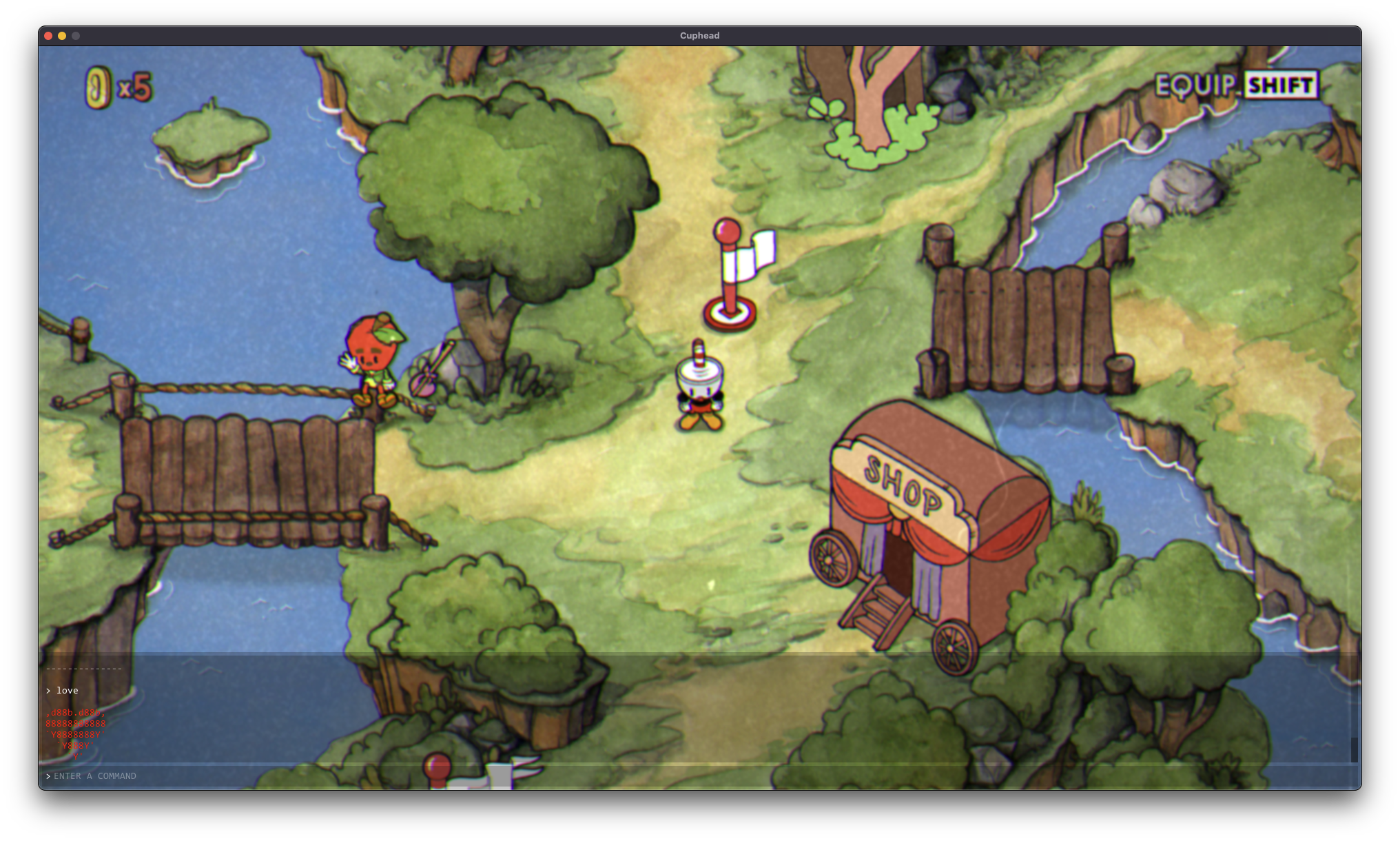
As we launch the game, we have access to the console and all the commands work!
Setting sensible defaults.⌗
At the beginning of each level I’d need to set player.invincible command. As I want to have it as a default we also should patch this debug in the PlayerStatsManager.OnAwake() as true so it is the default when we go into a level.
public class PlayerStatsManager : AbstractPlayerComponent
{
// ...
	protected override void OnAwake()
	{
		base.OnAwake();
		PlayerStatsManager.GlobalInvincibility = false;
		PlayerStatsManager.DebugInvincible = true;
		this.SuperInvincible = false;
// ...
Is this a good approach?⌗
Short answer: No.
Long answer:
No, because we are messing directly with the source code of the game, things will break after updates and you’ll need to do it all over again. This is just for educational purposes. Proper modding for this type of games requires proper modding tools and injectors like BepInEx and Harmony.
They basically inject custom code, instead of modifying directly the DLLs, this allows having multiple mods, modifying same classes and methods, and keep it working across updates in a robust way.
I did end up porting these patches to a BepInEx plugin, allowing me to hook into PlayerStatsManager.OnAwake() dynamically.
Now, I can enjoy the stunning art and music of Cuphead without worrying about an enemy wiping out my hard work and fun.